Understanding Object-Oriented Programming in JavaScript
What is Object-Oriented Programming (OOP)?
Object-Oriented Programming (OOP) is a programming approach where we organize code around objects instead of just functions and logic.
In OOP, we group data (properties) and behavior (methods) together into a single unit called an object.
This makes code:
Easier to understand
Reusable
Organized
Scalable
Blueprint → Objects

Think about a car blueprint:
A blueprint defines structure (color, engine, wheels).
But the blueprint itself is not a real car.
Using the blueprint, we can create many real cars.
In OOP:
| Real World | Programming |
|---|---|
| Blueprint | Class |
| Real Car | Object |
So, a class is a template, and an object is a real instance created from it.
What is a Class in JavaScript?
A class in JavaScript is a template used to create objects with shared properties and methods.
Example:
class Person {
  constructor(name, age) {
    this.name = name;
    this.age = age;
  }

  greet() {
    console.log("Hello, my name is " + this.name);
  }
}
Here:
Person→ classname,age→ propertiesgreet()→ method
Creating Objects Using Classes

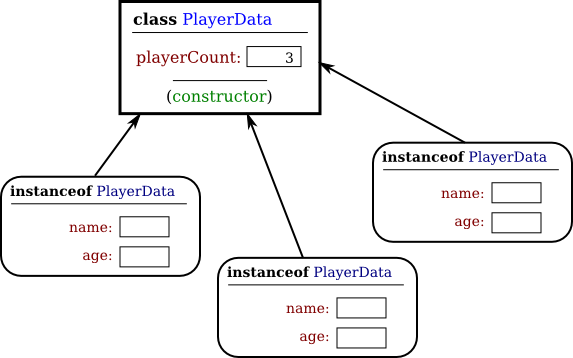
We create objects using the new keyword:
const person1 = new Person("Arnab", 22);
const person2 = new Person("Riya", 20);

person1.greet(); // Hello, my name is Arnab
person2.greet(); // Hello, my name is Riya
Notice how we reuse the same class to create multiple objects.
Constructor Method (Special Function)
The constructor runs automatically when an object is created.
It is used to:
Initialize values
Set up properties
Example:
class Car {
  constructor(brand, color) {
    this.brand = brand;
    this.color = color;
  }
}
const car1 = new Car("Toyota", "Red");
Methods Inside a Class
Methods are functions defined inside a class.
Example:
class Student {
  constructor(name) {
    this.name = name;
  }

  study() {
    console.log(this.name + " is studying.");
  }
}

const s1 = new Student("Rahul");
s1.study();
Basic Idea of Encapsulation
Encapsulation means:
Keeping data and methods together
Controlling how data is accessed
Simple example:
class BankAccount {
  constructor(balance) {
    this.balance = balance;
  }

  deposit(amount) {
    this.balance += amount;
  }
}
Users don’t directly change balance. Instead, they use methods like deposit().
This keeps data safe and organized.
Why OOP is Useful (Code Reusability)
Instead of writing the same code again:
Write once inside a class
Create multiple objects
Saves time and reduces errors.
Small Example Set (Beginner Friendly)
Example 1: Person
class Person {
  constructor(name) {
    this.name = name;
  }

  speak() {
    console.log(this.name + " is speaking.");
  }
}
Example 2: Car
class Car {
  constructor(model) {
    this.model = model;
  }

  drive() {
    console.log(this.model + " is driving.");
  }
}
Assignment Idea (Practice)
Create a class called Student
Requirements:
Add properties:
nameage
Add method:
- Print student details
Create multiple student objects
Example Solution:
class Student {
  constructor(name, age) {
    this.name = name;
    this.age = age;
  }

  printDetails() {
    console.log("Name:", this.name, "| Age:", this.age);
  }
}

const s1 = new Student("Arnab", 21);
const s2 = new Student("Riya", 20);

s1.printDetails();
s2.printDetails();